
Blood pressure monitor without Bluetooth: photograph SYS and DIA into a diary
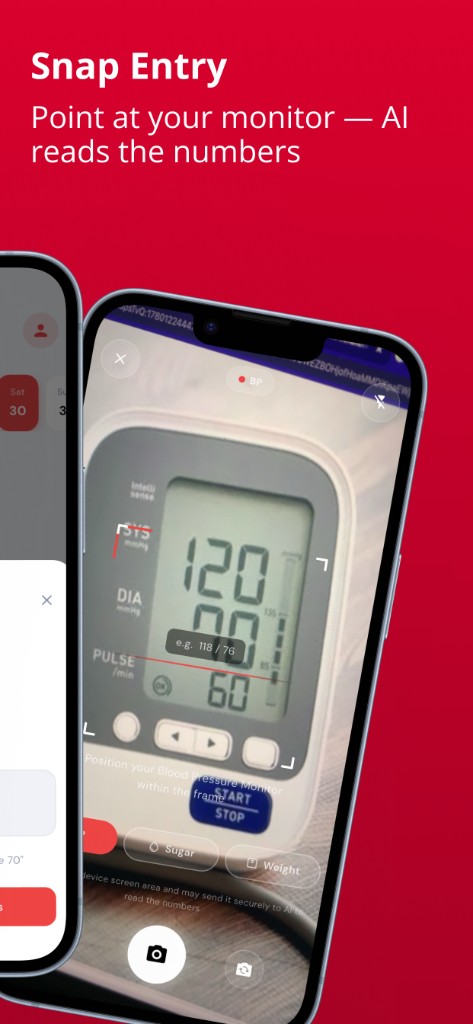
Searches like blood pressure monitor without Bluetooth, Omron Bluetooth not working, or blood pressure monitor Bluetooth pairing usually mean the same frustration: the cuff already showed systolic, diastolic, and pulse — and the phone app will not cooperate. Blood Snap lets you photograph the monitor screen, review SYS / DIA / pulse, and save them to a diary with no Bluetooth pairing.
Blood Snap is a personal wellness diary. It is not a blood pressure machine, not Omron Connect, not Withings, and not affiliated with any cuff brand. Always trust the numbers on the physical monitor over an unconfirmed snap.
Why people search blood pressure monitor Bluetooth pairing
Many modern upper-arm and wrist monitors advertise Bluetooth so readings can land in a brand app (Omron Connect, iHealth, Beurer, Withings BPM Connect, Qardio, and others). That path is fine when pairing works. Google Suggest fills with the times it does not:
- Omron Bluetooth not working / Omron Connect not pairing / Connect not working on iPhone
- Omron blood pressure monitor without Bluetooth (older Series models, or you simply want a log without the app)
- iHealth blood pressure monitor Bluetooth not working or not connecting
- Microlife or CVS Bluetooth pairing loops
- QardioArm not connecting / Qardio app not connecting
- Best blood pressure monitor without Bluetooth — people who prefer a screen-only cuff
Manual or basic digital cuffs never offered phone sync. The clinical numbers still sit on the display. That is enough for a blood pressure diary if you can capture them quickly.
Blood pressure monitor without Bluetooth — use the screen
Every home check that matters for a diary ends with three numbers most machines print clearly: SYS (systolic), DIA (diastolic), and often pulse. See how to read your blood pressure monitor and systolic, diastolic, and pulse.
Blood Snap's answer to BP monitor Bluetooth not working is camera convenience: photograph the display, let on-device OCR suggest the values, then confirm or edit before save. You do not need Omron Connect, Apple Health sync, or a paired cuff for that workflow.
Common home BP devices — and how snap still helps
Brands and model numbers change by country. The pairing story is surprisingly similar.
- Omron — Platinum, Series 10, Evolv, BP5450 / BP7450 / BP786-class devices: strong search demand for Omron Connect Bluetooth not working and how to pair. If Connect fails, the cuff screen still shows SYS/DIA; snap it.
- iHealth — Track and other connected cuffs: “Bluetooth not working” and “not connecting” are common. Photograph the reader when the app will not sync.
- Withings BPM Connect — designed around the phone; when setup stalls, the on-device reading (or companion display, depending on model) is still your source of truth for a manual or snap log.
- Beurer, Microlife, QardioArm — app setup and pairing complaints show up in Suggest; snap entry ignores the app layer.
- Certeza and other regional digital monitors — widely used as clear LCD cuffs (including markets like Pakistan). Many have no Bluetooth at all. Snap Entry works the same: frame the SYS/DIA/pulse digits.
- Manual aneroid or basic digital — no pairing by design. Type, speak, or photograph if the digits are readable.
Blood Snap is not certified by Omron, Withings, iHealth, Beurer, Microlife, Qardio, Certeza, or any cuff maker. It does not claim guaranteed OCR on every font or backlight. If a photo is unclear, type or speak what you see.
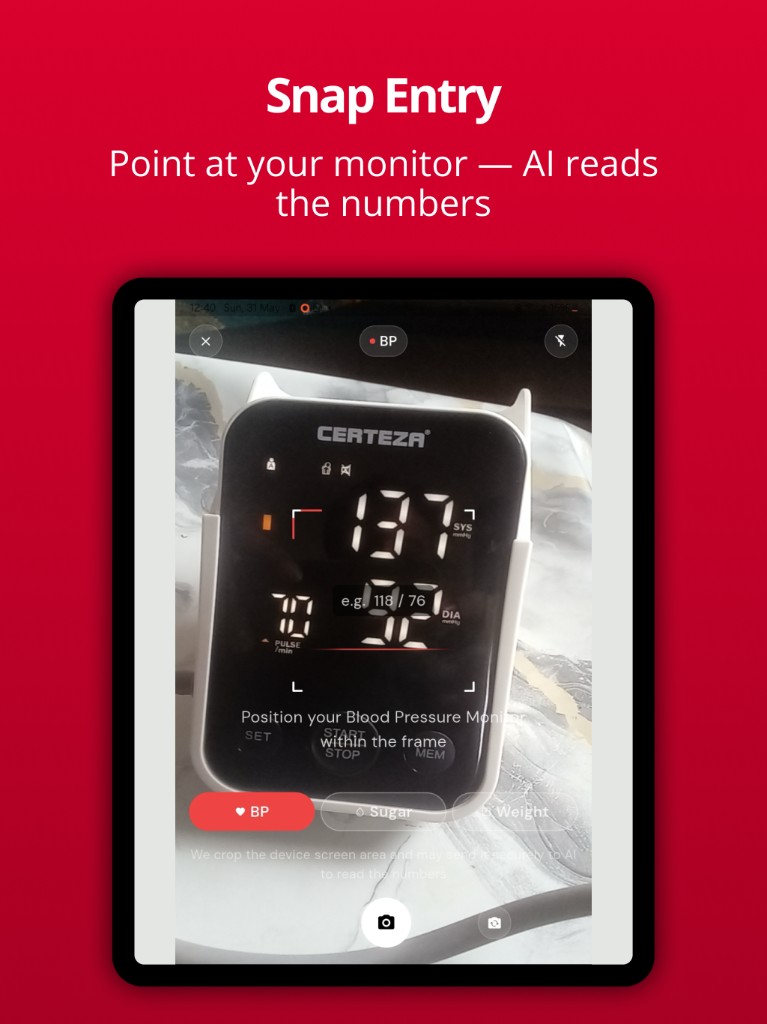
How Blood Snap snap entry works for BP
- Open Snap Entry and keep BP selected (Sugar and Weight use the same camera habit).
- On-device OCR first — the phone tries to read digits locally.
- With consent, OCR text or a cropped screen image may be parsed with AI — you still review everything. See the privacy policy.
- Confirm SYS, DIA, and pulse against the machine, then save.
- Not Bluetooth. Blood Snap does not pair with Omron Connect or any cuff radio.
More on voice + snap habits: snap and voice log blood pressure. For glucose meters with the same pairing pain, see Accu-Chek without Bluetooth.
Step-by-step — photograph a home BP reading
- Take a seated check with a validated cuff your clinician recommends. Wait until SYS, DIA, and pulse are stable on screen.
- In Blood Snap, start Snap Entry with BP mode (or pick a clear photo from your library).
- Fill the frame with the digit area; avoid glare and tilted shots.
- Review the suggested systolic, diastolic, and pulse. Fix any misread digit.
- Save. Chart and export later from your diary — not from a broken brand sync.
Omron Connect not pairing — when you can skip the app
Official Omron Connect (or iHealth / Beurer / Withings apps) still matter if your clinic or insurance expects that ecosystem, or you want manufacturer features. If your goal is a personal blood pressure diary next to sugar and weight, you can skip pairing: read the cuff, snap or type into Blood Snap, confirm, and move on.
That is practical for Omron Connect pairing error, Connect not opening on iPhone, Evolv Bluetooth not connecting, or any “BP monitor Bluetooth not working” loop — you still need today's readings for a weekly chart or clinic PDF.
Snap vs Bluetooth BP apps
| Need | Brand app + Bluetooth cuff | Blood Snap snap diary |
|---|---|---|
| Wireless transfer into Omron / iHealth / Withings apps | Yes, when pairing works | No — photo / type / voice instead |
| Log when Bluetooth is broken | Manual entry in their app, if available | Photograph the screen, confirm, save |
| Cuff with no Bluetooth | N/A | Same snap or type workflow |
| One diary with BP + sugar + weight | Usually BP-only ecosystems | Yes — personal wellness diary |
Build a BP diary from any home monitor
Consistency beats perfect wireless sync. Log morning and evening checks when your plan asks for them, then review 7-, 30-, and 90-day blood pressure charts. Export PDF or CSV for a visit. Habit tips: how to track blood pressure at home.
What this cannot do
- It does not inflate a cuff, validate monitor accuracy, or rank the “best” Bluetooth machine.
- It does not fix Omron Connect, iHealth, or Qardio pairing bugs.
- It does not diagnose hypertension or replace clinician advice.
- OCR is a convenience — always confirm digits before save.
Try snap logging in Blood Snap. Photograph your home blood pressure monitor — Omron, Certeza, Microlife, or any clear SYS/DIA display — confirm the numbers, and keep a free BP diary without Bluetooth pairing.
Educational information with public guideline citations. Not medical advice and not a diagnosis. Blood Snap is a personal wellness diary — not a medical device, blood pressure machine, glucometer, or CGM. Always follow your clinician's advice.